JERSEY DESIGN
Free Soccer Jersey Template: Plan the Front and Back
Download the blank front-and-back SVG, mark your colors, crest, name, and number, then use it as a concept sheet when you request a real garment mock-up. This template is a planning tool: it is not a print-ready pattern, licensed team artwork, or a promise about any supplier’s print area.
By bootswave Editorial ·

Download the blank front-and-back outline
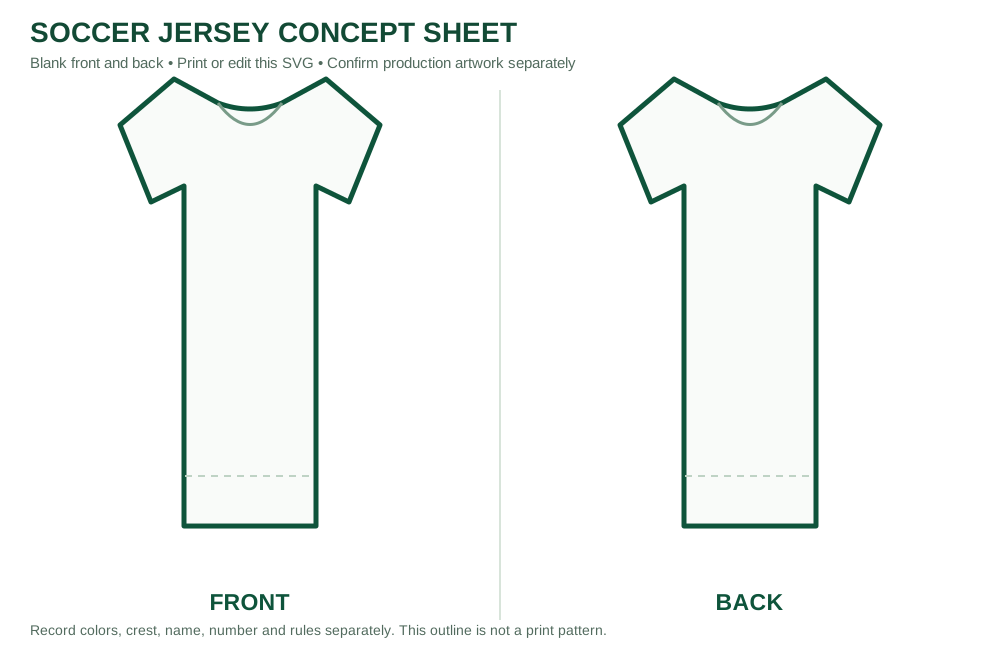
Download the free soccer jersey template (SVG). The file contains separate front and back short-sleeve outlines, open spaces for colors and artwork, and labels for design notes. You can open it in a modern browser to print or in a vector editor to change colors and add your own graphics. It has no real club crest, sponsor, licensed mark, or fixed print dimensions.
To print, open the downloaded SVG in a browser and select landscape orientation, fit to page. If you need a paper exercise, print it unedited and draw with markers. If you need a digital concept, duplicate the original file first and work on the copy. Save a dated version so a teammate can compare revisions. The outline is intentionally simple: actual jerseys vary in cut, collar, seam position, sleeve shape, and available decoration areas.
Use this as the first visual conversation, not the final production file. A manufacturer or printer may require its own pattern, color values, logo vector, decoration method, size breakdown, and approval proof. The jersey-making guide covers the larger process; this page gives you the blank worksheet and the decisions it should capture.
Decide what belongs on the front
Start with the main body and sleeve colors. Select a base that will remain legible beside the other team’s kit and, for a goalkeeper, distinguish the goalkeeper from teammates and officials where the competition requires it. IFAB Law 4 gives the underlying equipment and color principles; your league may add detailed requirements. A design that looks attractive in isolation can fail if the opposing team uses nearly the same color.
Place a crest, badge, sponsor, and optional chest number only after checking which of them the team actually owns or may use. The space shown on the template is illustrative. A crest that fits inside a rectangle on a flat sketch may cross a seam or wrinkle on a real small-size shirt. Ask for the decorator’s approved print or embroidery zone for each garment size, then scale and reposition the artwork there. Do not assume a logo size approved for an adult shirt will work unchanged for youth sizes.
Choose two or three colors before adding complex graphics. A restrained palette makes it easier to spot contrast problems. If you choose stripes, panels, or gradients, ask how they continue across the side seams and sleeves. The blank sheet can show intent, but it cannot predict print registration, fabric color under different light, or how a design stretches over a player’s body.
Build the back around readable names and numbers
On the back outline, write a sample surname and a sample number before selecting a final type style. A design that looks balanced with a short name may crowd the shoulder when a player has a longer surname. Check the smallest size in the order, not only the adult sample. Ask for a real-size proof showing the longest name and largest number combination expected in your group.
Do not copy a professional competition’s number dimensions by default. UEFA’s Equipment Regulations apply to its specified competitions; a local youth or recreational league may use different rules. Ask your organizer about permitted name, number, sponsor and badge sizes. Then use the printer’s garment-specific decoration area. Our number size guide helps separate rules from production suggestions.
Test contrast at a distance. A pale number on a pale striped panel can become hard to read even if both colors look good on screen. Printing a paper mock-up at a small scale is a useful visual check, but it is not a substitute for a real-color proof. If the back is busy, consider a solid panel behind the number, subject to the team’s design and league requirements.
Put design notes beside the drawing
Write the purpose of the shirt: game uniform, training top, fan piece, or gift. Then record the expected sizes, sleeve length, preferred fabric feel, and whether the shirt must match a particular club or league rule. For a single custom shirt, the same checklist applies at a smaller scale. A team buyer can add a roster, quantities by size, spare shirts, and delivery deadline after the visual concept is accepted.
Record the logo source and who approved its use. Many attractive logos found online are protected by someone else’s rights; a blank template does not give permission to reproduce them. If you are creating a fan-inspired personal design, avoid implying it is an official club kit. Keep the original artwork files separately from screenshots so a printer can ask for a sufficiently sharp version later.
Consider the actual garment shape. A slim athletic cut and a relaxed fan cut can place the same art at different apparent heights. The outline does not determine fit. Check the exact size chart and, for a large order, compare a physical sample in the intended sizes. A design proof approves placement and color intention; a size sample answers fit and fabric questions. These are different approvals.
Turn the worksheet into a useful supplier request
Send the edited front and back plus the original logos as separate files. State which elements are required and which are open to suggestion. Ask for a garment-specific proof with exact color references, decoration method, approximate placement on each size, and any unavoidable limitations. If the design crosses a seam, ask how that join will look. If the shirt will be washed often, request care instructions for the chosen print or embroidery.
Review the proof at full size. Confirm spelling, player numbers, sponsor order, badge rights, and whether the back remains readable. Ask who is responsible for errors introduced after approval. For a team, keep one approved version with a date and have the responsible person sign off the roster. Do not rely on a messaging thread with several near-identical images to determine the final version.
Bootswave can discuss a single jersey or team set through our inquiry page or WhatsApp. Send the concept sheet, desired size or size breakdown, destination country, and whether you want a plain or personalized shirt. We can confirm available options and price; the template itself does not indicate stock or a fixed production specification.
Common questions
Is this template print-ready for manufacturing?
No. It is a blank design worksheet. The actual supplier must confirm its garment pattern, artwork requirements, decoration area and proof.
Can I use the template for one jersey?
Yes. Plan front and back even for one shirt, then confirm the exact model, size, price and personalization before ordering.
May I add a professional club logo?
Only if you have the necessary rights or authorization. The blank template does not supply licensed marks or permission to reproduce them.
The practical answer
Download the original SVG, draw both views, record colors and lettering, then send the concept to the supplier for a garment-specific proof. Check league rules, artwork rights and real sizes before production. A clear worksheet shortens the design conversation because it shows what you want and what still needs verification.
Sources and scope
This guide combines published manufacturer guidance and editorial decision steps. It is not a hands-on test of a particular bootswave product. Product instructions and venue rules for your exact model take priority.
Ask about a product
You can ask about one pair or one jersey. Tell us the style, size, delivery country and your question; we can confirm options and price. Message bootswave on WhatsApp or use this form.
Published: · Updated:
